Sunday, August 9, 2009

Winamp Pro 5.56


Winamp Pro 5.56 | 14 Mb

Nullsoft Winamp Pro is a fast, flexible, high-fidelity media player for Windows. Winamp supports playback of many audio (MP3, OGG, AAC, WAV, MOD, XM, S3M, IT, MIDI, etc) and video types (AVI, ASF, MPEG, NSV), custom appearances called skins (supporting both classic Winamp 1.x/2.x skins and Winamp 3 freeform skins), audio visualization and audio effect plug-ins (including two industry dominating visualization plug-ins), an advanced media library, Internet radio and TV support, CD ripping, and CD burning.

Download Location : ziddu.com -

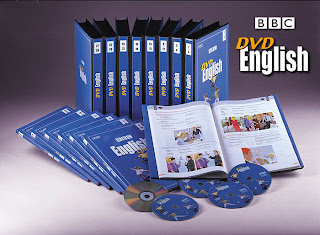
Follow Me BBC Learning


Follow Me BBC Learning
PDF +5 Audio CDs + 60 Video 2.18 GB


Beginner

The complete English-teaching video course
1. What’s your name?
2. How are you?
3. Can you help me?
4. Left, right, straight ahead.
5. Where are they?
6. What’s the time?
7. What’s this? What’s that?
8. I like it very much.
9. Have you got any wine?
10. What are they doing?
11. Can I have you name, please?
12. What does she look like?
13. No smoking.
14. It’ on the first floor.
15. Where’s he gone?

Part_1 - Part_2 - Part_3 - Part_4 - Part_5 - Part_6

These are in more little pieces (@52Mb) :
Part_01 - Part_02 - Part_03 - Part_04 - Part_05 -
Part_06 - Part_07 - Part_08 - Part_09 - Part_10 -


Elementary

16. Going away.
17. Buying things.
18. Why do you like it?
19. What do you need?
20. I sometimes work late.
21. Welcome to Britain.
22. Who’s that?
23. What would you like to do?
24. How can we get there?
25. Where is it?
26. What’s the date?
27. Whose is it?
28. I enjoy it
29. How many and how much?
30. What have you done?

Part_01 - Part_02 - Part_03 - Part_04 - Part_05 -
Part_06 - Part_07 - Part_08 - Part_09 - Part_10


Intermediate

31. Haven’t we met before?
32. What did you say?
33. Please stop!
34. How can I get to Brightley?
35. Where can I get it?
36. There’s a concert on Wednesday
37. What’s it like?
38. What do you think of him?
39. I need someone
40. What were you doing?
41. What do you do?
42. What do you know about him?
43. You shouldn’t do that.
44. I hope you enjoy your holiday
45. Where can I see a football match?

Part_01 - Part_02 - Part_03 - Part_04 - Part_05 -
Part_06 - Part_07 - Part_08 - Part_09 - Part_10


Advanced

46. When will it be ready?
47. Where did you go?
48. I think it’s awful
49. A room with a view
50. You’ll be ill
51. I don’t believe in strikes.
52. They look tired.
53. Would you like to…?
54. Holiday plans.
55. The second shelf on the left.
56. When you are ready…
57. Tell them about Britain.
58. I liked everything.
59. Classical or modern?
60. Finale.

Part_01 - Part_02 - Part_03 - Part_04 - Part_05 -
Part_06 - Part_07 - Part_08 - Part_09 - Part_10


Book + 5CDs

Part_1 - Part_2 - Part_3 - Part_4


Saturday, August 8, 2009

Kertas Kerja Perseorangan (KKP) Diklatpim Tingkat IV Tahun 2009

This is My Kertas Kerja Perseorangan (KKP) Diklatpim Tingkat IV Tahun 2009. Feel free to use my personal paper e-book. Hope this will usefull.
Download Location : ziddu.com -

Gnomon Workshop: Photo Retouching in Adobe Photoshop

Gnomon Workshop: Photo Retouching in Adobe Photoshop [Tutorial] | 570 MB |

Trainer: Meghan FARRELL | Product Code: MFA01 | 157 Minutes of Lecture | For Windows and Mac


With this DVD you will learn the step-by-step process of using Adobe Photoshop® retouching techniques to transform and prepare images for production level commercial photography. Meghan Farrell will walk you through the steps of retouching a fashion shoot as a basis for learning the primary skill sets to make skin and hair look flawless without looking artificial. You will learn how to retouch and maintain natural skin, hair and hands and reshape the body. You’ll be introduced to indispensable methods of using adjustment layers, layer masks and color correction. The techniques demonstrated in this DVD will help you retouch like a professional, whether working on your own images or for those of a client. The cutting edge techniques demonstrated in this DVD will help you stand out when seeking work in this fast-paced industry.
1. SETTING PREFERENCES
We begin by establishing some basic Photoshop® settings to allow us to work more fluently once we get started.
2. COLOR CORRECTING

Working with adjustment layers and masks is really the only way to color correct images in the professional setting. Having a st rong knowledge of how to use masks quickly will be one of your strongest assets when working in the world of photographic retouching.

3. SKIN RETOUCHING

Using the healing brush and the clone stamp set at various dark/light settings is your best bet for fast touch ups. We are going to be focusing a lot on skin. Remove any large blemishes first and then focus on balancing tone.

4. KEEPING SKIN NATURAL

For a flawless yet naturally textured look, the burn and dodge tool is the only way to go. Star t by burning in the areas that are too light and dodging out the areas that are too dark unt il the skin is a balanced neutral tone. This goes for zoomed in as well as zoomed out.

5. EYES AND SURROUNDING AREA

Use the dodge and burn, clone and healing brush tool to clean up, reshape and sculpt the eye area. Emphasizing the iris and pupil will create a more dramatic look. Always remove the red from the eye whites, but don’t “white-out” the whites, keep the ball of the eye looking spherical.

6. HAIR AND MORE
Using the brush tool set to a low opacity is great for painting in hair strands. Use the clone stamp or copy and paste method for larger areas of hair. Be sure to match the surrounding areas of hair for color, density and sharpness so nothing stands out as unnatural.

7. REVIEWING SKIN TECHNIQUES

On our second image we will review some of the basics learned in the previous chapters for natural skin clean up.

8. SKIN FOLDS

Skin folds include anything from armpits to hand creases. In this chapter I’ll go over how to smooth and refine the armpit area to create a very natural subtle armpit line. Remember to keep your lines straight and apply the basic skin techniques to the surrounding armpit area.

9. REMOVING OBJECTS FROM THE BACKGROUND

Once you have removed the object from the background, focus on rebuilding that background so it blends in with the rest of the image. Keep your lines straight. Pay special attention to where tones change and fade into each other. Using the clone tool set to a medium opacity will help you achieve natural looking results.

10. HANDS AND HAIR REVIEW
Even well manicured hands can look rough once photographed, so pay special attention to fingernails, cuticles, knuckles and veins. Clone stamp set to lighten will give you natural looking knuckles.

11. BODY MORPHING

Using the Liquify filter opens up a new world of possibilities. Learn here how to gently reshape a figure for natural results. Liquify is also a great asset for smoothing lines close-up and can be used on the image as a whole or on selected areas.

12. INTENSIFYING OBJECTS AND SHAPES

Using special techniques to intensify objects gives directors that “POP!” they are looking for.

13. CHANGING COLORS OF SELECTED AREAS

Sometimes you may need to change the color of an object in an advertisement, especially if the ad is for something that comes in more than one color. Having a good understanding of adjustment layers is essential.


About the Instructor:

Meghan Paddock Farrell received a BFA in Photography from Rhode Island College. Her understanding of the color darkroom process as well as her background in fine art informs her ability to accurately manipulate color, capture the 3D human form and translate these through lighting effects into the 2D space. As the Senior Retoucher at the publishing house of Weider Publications, she oversaw, enhanced and brought tens of thousands of images to a production level, print-ready, status. Her work has been published in hundreds of magazines including Glamour, Allure, Vanity Fair, Los Angeles Magazine, Shape Magazine as well as many more domestic and international titles and advertisements. She has also worked as retoucher at Getty Images, SuperColor Hollywood, and for notable fashion photographers Guilano Bekor, Norman Jean Roy and Ondrea Barbe. Currently she works as an independent contractor for several advertisers and publications including OPI, VIV and others.


The Minimum System Requirements are:

1GHz or faster processor

512 MB RAM

64 MB Video RAM

DVD-ROM Drive

5 GB of hard disk space

1280 x 1024 display


The Minimum Operating System Requirements are:

Microsoft® Windows® XP Professional,
Microsoft Windows 2000 Professional

Apple® Mac® OS X 10.2


This DVD-ROM also requires the Quicktime Movie Player (Version 5.0.5 or higher), and Acrobat Reader (Version 5.0 or higher) in order to view its contents.

Download Location :

MyBlog Related Search

Custom Search